The Hidden Vulnerabilities of Fixed-Height Card Grids
The Illusion of Perfect Alignment
At first glance, fixed-height cards seem like a designer's dream. Mockups show every tile matching perfectly in a grid, with short titles and tidy excerpts. The layout appears stable, clean, and trustworthy. But this stability is an illusion—one that shatters the moment real-world content enters the picture.
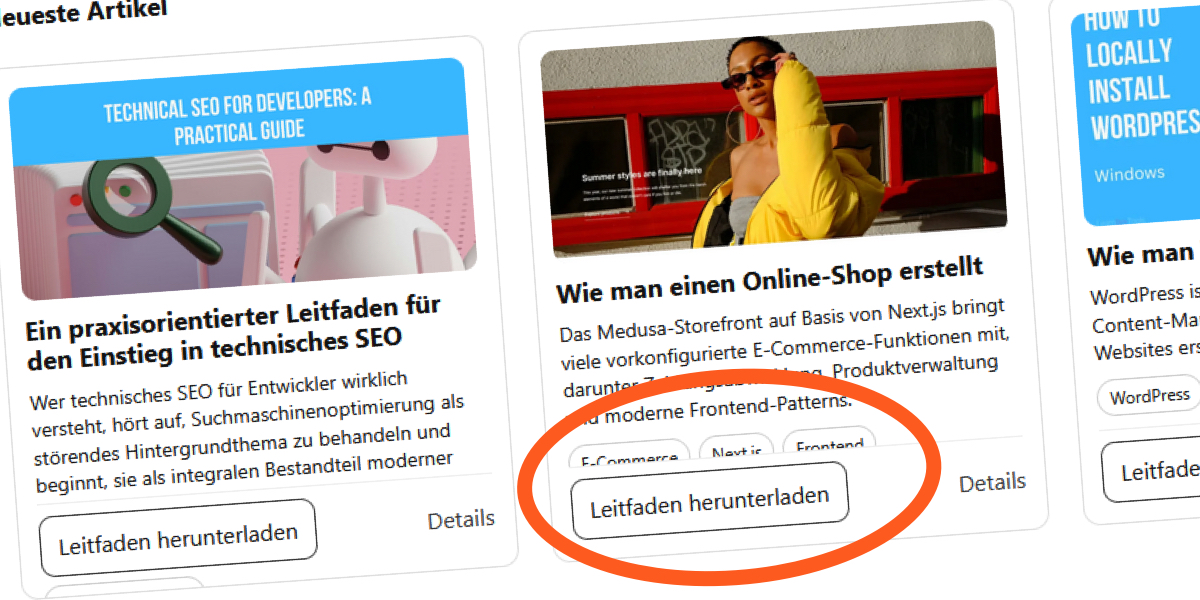
When you implement such a design, you lock each card to a precise pixel dimension. The browser obediently clips or hides anything that exceeds that boundary. Everything works—until an editor updates a heading, a translator adds longer words, or a user increases their default font size for readability.
A Real-World Example: The "Recent Articles" Section
While building a "Recent Articles" component for a blog, I encountered this exact issue. The original design assumed short English titles and compact excerpts. The fixed height accommodated them comfortably—at first.
The grid looked solid:
- Two-line titles with
line-clamp - A three-line excerpt
- Perfect alignment across all cards
But then the content changed. Translating the same articles into French introduced longer words and phrases. The layout started to struggle. German translations made it even worse, with compound words pushing past the invisible boundaries.
Language Expansion Breaks the Grid
What worked for English broke for French and German. The fixed heights didn't adjust; the text simply overflowed or was clipped. The component's apparent robustness depended entirely on a fragile assumption: that the content would always stay within those exact pixel limits.
Code Breakdown: The CSS That Sets the Trap
The implementation used common techniques to enforce height constraints:
.card__title {
  margin: 0 0 8px;
  font-size: 18px;
  line-height: 1.2;
  display: -webkit-box;
  -webkit-line-clamp: 2;
  -webkit-box-orient: vertical;
  overflow: hidden;
}

.card__excerpt {
  margin: 0 0 10px;
  font-size: 14px;
  line-height: 1.4;
  display: -webkit-box;
  -webkit-line-clamp: 3;
  -webkit-box-orient: vertical;
  overflow: hidden;
}
At a glance, this seems solid. The line-clamp limits the number of lines, and overflow: hidden hides any excess. But under the hood, the fixed container height remains unchanged. When font sizes increase—for accessibility or due to browser zoom—each line grows taller. The clamped text now occupies more vertical space than the container can offer.
The Breaking Point: Removing the Safety Net
To see the fragility clearly, we can remove overflow: hidden:
.card__title {
  display: -webkit-box;
  font-size: 18px;
  line-height: 1.2;
  margin: 0 0 8px;
  -webkit-line-clamp: 2;
  -webkit-box-orient: vertical;
  /* overflow: hidden; */
}

.card__excerpt {
  display: -webkit-box;
  font-size: 14px;
  line-height: 1.4;
  margin: 0 0 10px;
  -webkit-line-clamp: 3;
  -webkit-box-orient: vertical;
}
Without that safety net, the content spills out. The layout fails visibly. The browser doesn't treat this as a conflict—it simply resolves the layout by letting the text overflow, breaking the clean grid we intended.

Why Fixed Heights Are Fundamentally Fragile
Normally, a block element grows naturally to contain its content. But when you set an explicit height, you sever that relationship. The container can no longer expand, and the content has nowhere to go. Any variation—a longer translation, a larger font, a taller line-height—creates pressure inside the card. The result is either hidden text (with overflow: hidden) or visual overflow (without it).
This isn't just a CSS quirk; it's a design flaw. The fixed height assumes that the content will never exceed its boundaries. In practice, content is unpredictable. Users with low vision often increase their default font size. Translations can double word lengths. Even a minor content update can break the layout.
Best Practices for Avoiding Fixed-Height Fragility
To build resilient card layouts, consider these approaches:
- Use min-height instead of height – Let cards grow as needed while maintaining a minimum size for alignment.
- Flexible grid systems – Use CSS Grid or Flexbox with
align-items: stretchto keep cards equal height without fixing a pixel value. - Responsive line-clamp – Combine
line-clampwith flexible containers; the clamp limits lines, but the container can still grow if needed. - Test with real content – Always test with the longest possible strings, including translations and user-generated content.
- Accessibility testing – Increase browser font size to 200% and check for overflow or clipping.
Fixed-height cards may look stable, but their fragility emerges quickly. By designing for flexibility rather than rigidity, you create layouts that withstand the inevitable changes in content and user preferences.
Related Articles
- How AI Revolutionized Firefox Security: 271 Vulnerabilities Found in Days
- Mastering End-to-End Encryption: A Practical Guide to Securing Your Digital Conversations
- Apple’s Next-Gen MacBook Pro with OLED and Redesign Pushed to Late 2026: What You Need to Know
- Tech Giants Agree to Pre-Release AI Safety Audits by Commerce Department
- Kubernetes v1.36 Arrives: User Namespaces Finally Go GA for Enhanced Container Security
- Kubernetes v1.36: In-Place Pod-Level Resource Scaling Hits Beta, Here's What You Need to Know
- Safari Technology Preview 242: Key Features and Bug Fixes Explained
- 5 Cutting-Edge Web Development Features You Need to Know Right Now