Writing JSON.stringify-Compatible Code: How to Leverage V8’s 2x Faster Serialization
Overview
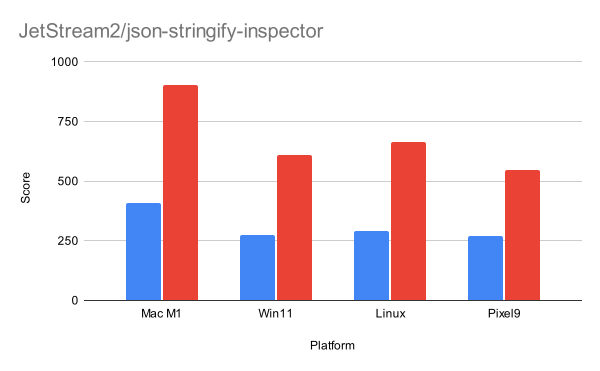
JSON.stringify is one of the most frequently used functions in JavaScript. Every time you send data to a server, cache it in localStorage, or save application state, you're calling JSON.stringify. Its performance directly impacts page load times, user interaction responsiveness, and overall application speed. Recently, the V8 team introduced a set of optimizations that make JSON.stringify more than twice as fast in many common scenarios. This tutorial explains how you can write your code to take full advantage of these improvements. You'll learn what triggers the fast path, how to avoid side effects, and practical steps to ensure your objects serialize at maximum speed.
Prerequisites
- Familiarity with JavaScript and JSON.stringify
- Basic understanding of object serialization concepts
- A modern browser (e.g., Chrome 120+) or Node.js 21+ to test the optimizations
Step-by-Step Instructions
1. Understanding Side Effects
V8's fast path relies on one critical condition: serialization must be side-effect-free. A side effect is any action that changes state or interacts with the outside world during the serialization process. The most common culprits include:
- User-defined
toJSON()methods that modify other objects or call external APIs - Getter functions that execute arbitrary code when accessed
- Operations that cause garbage collection (e.g., flattening
ConsString)
If V8 detects any of these, it falls back to the slower general-purpose serializer. To stay on the fast path, ensure your objects are plain data containers with no dynamic behavior during stringification.
2. Use Plain Objects and Primitive Values
The fast path works best with objects that are simple maps of string keys to primitive values (strings, numbers, booleans, null) or nested plain objects. Avoid using:
- Classes with custom
toJSON - Objects with
getproperties - Arrays containing non-plain objects (e.g., Date instances without proper toJSON)
Example - Fast:
const fastObject = {
  name: 'Alice',
  age: 30,
  address: {
    city: 'New York',
    zip: '10001'
  }
};
JSON.stringify(fastObject); // Triggers fast path
Example - Slow:
const slowObject = {
  name: 'Bob',
  birthDate: new Date('1990-01-01'),
  get greeting() {
    return 'Hello';
  },
  toJSON() {
    return { special: 'data' };
  }
};
JSON.stringify(slowObject); // Falls to slow path
3. Avoid Custom toJSON() Methods
If you must serialize class instances, override toJSON() with a method that returns a plain object. However, doing so will push your code onto the slow path because V8 cannot guarantee that your method has no side effects. For maximum speed, keep your data as plain objects from the start.
4. Understand String Representation and Use ASCII Where Possible
V8 stores strings internally in two forms: one-byte (ASCII characters) and two-byte (Unicode characters beyond ASCII). The fast serializer has two compiled variants – one for each type. To avoid branching and stay on the fastest path, keep your string values within the ASCII range (0–127). This is especially important for keys.
Tip: If you need non-ASCII characters (e.g., emoji), consider normalizing them or using escape sequences? Actually, you cannot control the encoding of strings in JSON.stringify output – UTF-8 is standard. But the internal representation matters for performance. Use ASCII whenever possible to ensure one-byte internal representation and avoid a fallback to the two-byte path.
5. Watch for ConsString and Garbage Collection
When you concatenate strings dynamically, V8 may create a ConsString object. During serialization, flattening a ConsString can trigger garbage collection, which V8 classifies as a side effect. To avoid this, precompute string values or use template literals in a way that minimizes concatenation. For property keys, always use string literals rather than computed keys that concatenate variable values.
6. Embrace the Iterative Serialization Model
Previously, JSON.stringify used recursion, which limited the depth of object graphs. The new fast path is iterative, meaning it can handle deeply nested objects without stack overflow. This also eliminates stack overflow checks during serialization, gaining speed. There's no action needed on your part – just know that very deep hierarchies are now faster and more memory-efficient.
7. Test Whether Your Code Uses the Fast Path
You can verify if V8 is using the fast path by using Chrome’s DevTools Performance panel or by measuring execution time with console.time. There is no public API to query the path, but a significant speed improvement (2x or more) compared to older V8 versions indicates you are hitting the fast path. Alternatively, enable V8’s internal logging flags in Node.js (e.g., --trace-opt-verbose) but this is advanced.
Common Mistakes
- Using getters on properties: Any property defined with
getwill cause V8 to check for side effects and typically fall back to the slow path. Always use plain values. - Including Date objects without
toJSON: The Date object has a built-intoJSONthat returns a string. However, any user-definedtoJSONon other objects breaks the fast path. Stick tonew Date().toISOString()and store the result. - Using Symbols as property keys: Symbols are ignored by JSON.stringify, but if you mistakenly expect them to appear, you may be tempted to add a custom
toJSON. Don’t – just remove symbol keys. - Mutating objects during serialization: Even if you don’t have an explicit
toJSON, if your code accidentally triggers side effects (e.g., logging or modifying state in a getter), the fast path is avoided. Keep it pure. - Ignoring two-byte string overhead: If you have a single two-byte character in a key, the entire key is stored as two-byte. Use ASCII keys exclusively for best performance.
Summary
V8’s JSON.stringify is now more than twice as fast because of a new side-effect-free fast path that uses iterative traversal and templatized string handling. To benefit, write your code with plain objects, avoid custom toJSON and getters, keep strings ASCII, and avoid constructions that trigger garbage collection. By following these guidelines, you’ll ensure your application serializes data at maximum speed, improving overall performance.
Related Articles
- Web Developer Curates Top CSS Color Palettes After Abandoning Tailwind
- Browser-Based Testing for Vue Components: A No-Node Approach
- Crafting a Dynamic Zigzag Layout with CSS Grid and Transform Tricks: 10 Key Steps
- Exploring the Latest Web Innovations: Canvas HTML, Hexagonal Analytics, E-Ink OS, and CSS Image Swaps
- 10 Things You Need to Know About the End of Ask.com
- Monitoring AI Agents in Production with Grafana Cloud’s New Observability Features
- 6 Critical Facts About Google’s Prompt API and Chrome’s Gemini Nano
- Building Apple’s Vision Pro Scrolly Animation with Pure CSS: Q&A