Wear OS 7: 7 Game-Changing Features Coming to Your Pixel Watch
Google has officially unveiled Wear OS 7, a major update that bridges the gap between smartwatches and smartphones. With a focus on seamlessness, interactivity, and personalization, this new version brings a host of features that were previously exclusive to Android devices. From live updates that keep you in the moment to revamped widgets that transform your wrist into a command center, here are the seven key things you need to know about Wear OS 7.
1. Live Updates: Real-Time Information at a Glance
Wear OS 7 introduces Live Updates, a feature that surfaces timely information directly on your watch face without requiring you to open an app. Whether it's your next meeting’s start time, a package delivery status, or live scores from a sports game, these updates appear as compact, interactive tiles. They're powered by Google's Smart Context engine, which learns your routines and prioritizes what matters most. For example, if you have a flight, the watch automatically shows your boarding pass and gate number when you approach the airport. Live Updates also support third-party apps, so ride-sharing, food delivery, and music services can push relevant notifications. This eliminates the need to constantly check your phone, making your watch a true extension of your digital life.
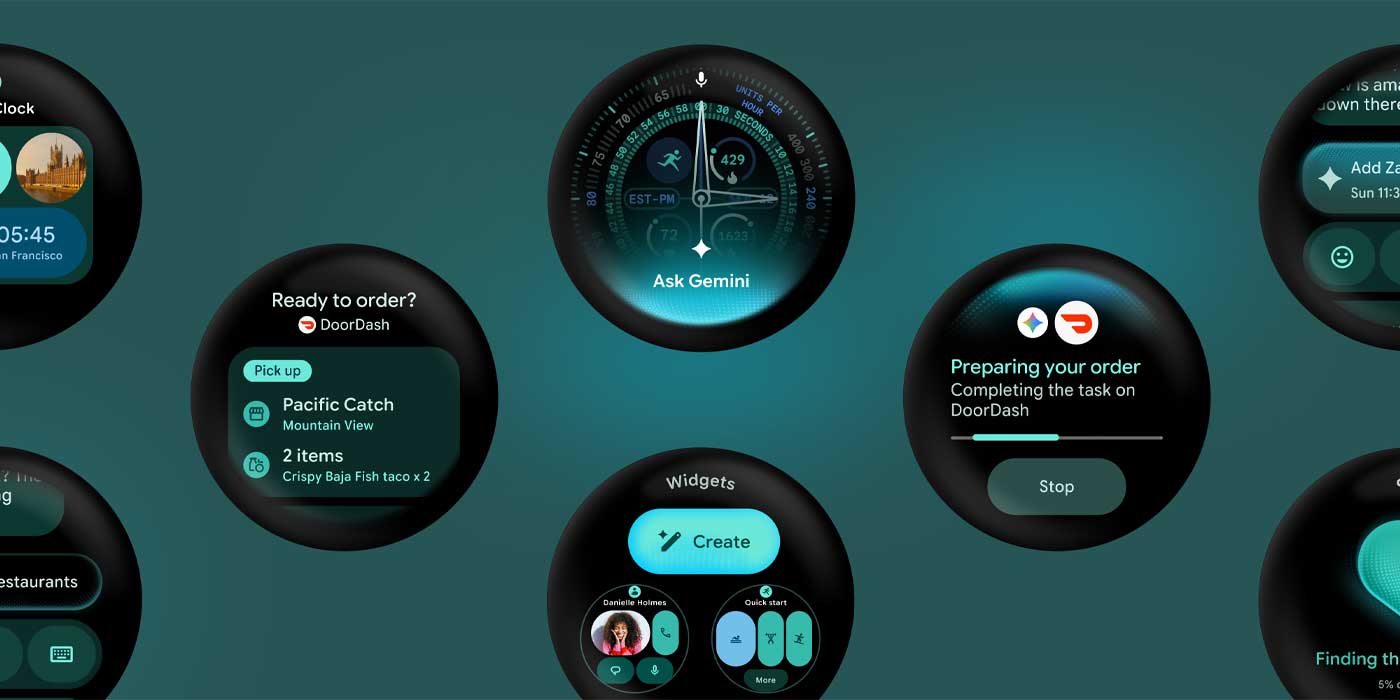
2. Revamped Widget System: Your Wrist, Your Dashboard
Widgets are getting a major overhaul in Wear OS 7. Instead of static glanceable icons, you now have dynamic, resizable widgets that can display rich content like weather forecasts, calendar agendas, and fitness progress. You can arrange them in a customizable stack, swiping left or right to cycle through. Each widget can be interactive—tap a music widget to play/pause, or tap a todo list to check off items. Developers can create custom widgets that update in real time, such as a stock ticker or a countdown to a special event. This system uses Material You theming, so widgets automatically adapt to your watch face’s color palette. The result is a more efficient, personalized interface that lets you see exactly what you need, when you need it.
3. Deeper Android Integration: Seamless Ecosystem
Wear OS 7 aligns more closely with Android’s design language and functionality. For instance, you can now respond to messages directly from notifications using full keyboard input or voice dictation, with improved accuracy powered by Google Assistant. Smart Replies (borrowed from Android) suggest contextual responses based on your conversation history. Media controls now mirror the Android 14 panel, letting you quickly switch between devices or adjust volume. A new cross-device clipboard syncs copied text between your phone and watch—copy a link on your phone, paste it into an email on your watch. These integrations reduce friction, making the watch feel less like an accessory and more like an integral part of your mobile experience.
4. Enhanced Health and Fitness Tracking
Google is stepping up its health game with Wear OS 7. The update introduces advanced sleep tracking that detects sleep stages (light, deep, REM) and provides a “Sleep Score” with actionable insights. SpO2 monitoring is now more accurate, using multiple sensors and machine learning. For athletes, there’s automatic exercise detection for over 40 activities—the watch starts tracking when you start running without any manual input. A new Wellness Dashboard consolidates your heart rate, stress, and activity data into one view. Integration with Google Fit and third-party apps (like Strava) is tighter, allowing real-time data sharing. These improvements are backed by Google’s research in health wearables, aiming to compete with dedicated fitness trackers.
5. New Watch Faces and Customization Options
Wear OS 7 ships with a redesigned watch face studio that offers dynamic complications. You can choose from over 30 new templates, each with multiple data slots you can assign to different apps—like weather, heart rate, or next alarm. Some faces are always-on optimized to save battery while still showing essential info. There’s also support for animated GIFs and video loops as backgrounds, allowing for truly unique designs. Google has opened the API for third-party developers, so you can expect a flood of creative faces from the community. The new Time Sync feature ensures that if you change the watch’s time zone, all complications update automatically—perfect for travelers.

6. Improved Battery Life and Charging
One of the biggest complaints about smartwatches is battery life. Wear OS 7 introduces battery optimization modes that intelligently switch between performance and power saving. For example, during sleep, the watch enters “Trickle Mode,” disabling non-essential radios. Adaptive brightness now uses AI to learn your environment, dimming the screen faster when not needed. Charging speed has been improved—30 minutes of charge gives you up to 8 hours of typical use. Google has also partnered with Qualcomm to optimize the Snapdragon W5+ Gen 2 chip for better efficiency. While you still won’t get a week of battery, you can comfortably go through two days with moderate use—a significant step up from previous versions.
7. Developer-Friendly APIs and Updates
To encourage a richer app ecosystem, Wear OS 7 provides new developer tools. The Complication API v2 allows widgets and watch faces to interact seamlessly—you can now build apps that update complications in real time (e.g., a live stock ticker). Tile API has been expanded to support scrollable content and custom animations. Google is also introducing Wear OS Emulator with more realistic sensor simulations, making it easier for developers to test without a physical device. The update includes Kotlin-first libraries and better support for Jetpack Compose, so code is more concise. This focus on developer experience should lead to a larger, higher-quality app catalog—something Wear OS has struggled with in the past.
Conclusion
Wear OS 7 is not just an incremental update; it's a thoughtful refinement that addresses many user pain points while introducing innovative features. The combination of live updates, revamped widgets, deeper Android integration, and improved health tracking promises to make Pixel Watches more capable and intuitive. While we'll need to see how battery life and third-party adoption pan out in real-world use, Google's direction is clear: a smartwatch that truly understands your day-to-day needs. As developers embrace the new APIs, the platform is poised to become a strong competitor in the wearable space. Whether you're a fitness enthusiast, a productivity fanatic, or someone who just wants a stylish companion, Wear OS 7 has something for you.
Related Articles
- Android APK Tool apkeep Reaches Version 1.0.0, Adding Google Play Cloud Profile Downloads and Anonymous Login
- Safari Technology Preview 243: Key Fixes and New Features Explained
- 7 Essential Microsoft 365 Updates You Can't Afford to Miss in 2026
- Zuckerberg's $500M Bio-AI Initiative: Digital Twin of Every Human Cell in Pursuit of Curing All Diseases
- Top Tech Deals: Galaxy Watch 8 Classic Slashed by $300, Samsung Tabs at Record Lows, Google TV Streamer, and More
- Apple Debuts Safari Technology Preview 242 with Groundbreaking CSS and Accessibility Fixes
- 6 Surprising Lessons from the First 24 Hours of My Global Store Launch
- 5 Key Developments in the Fight Against Screen Time in Schools: Edtech Vetting Under Fire